GTA V is still one of Twitch's biggest categories, and most of that is roleplay: long, character-driven streams on community RP servers, which run on PC. Viewers stay for hours, so the overlay should be calm, readable and out of the way.
Where to stream it from
Platforms: PC, PS5, Xbox Series X|S (and last-gen consoles). RP servers are PC-only.
OBS settings
| Platform | Resolution and frame rate | Bitrate |
|---|---|---|
| Twitch (standard) | 1080p60, or 900p/936p60 for fast games | 6,000 kbps |
| Twitch, Enhanced Broadcasting | Up to 1440p (Affiliates and Partners) | Set automatically |
| YouTube | 1440p60 or 4K if your upload allows | 9,000 to 18,000 kbps at 1440p |
| Kick | 1080p60 | 6,000 to 8,000 kbps |
Your upload speed and GPU decide the rest: the stream settings finder works it out, and OBS settings by resolution lists the exact boxes to fill in.
Overlay layout: don't cover the game
The minimap and health bars are bottom-left. Keep the webcam top-right or bottom-right, and a chat box on the right edge.
A matching overlay look
The Neon Nights theme in the Overlay Suite restyles your alerts, chat, goal bar and labels in one click, and the starting soon and BRB screens have a matching HD animated scene. Both are our own designs, drawn as vectors so they stay sharp at 1080p, 1440p and 4K.
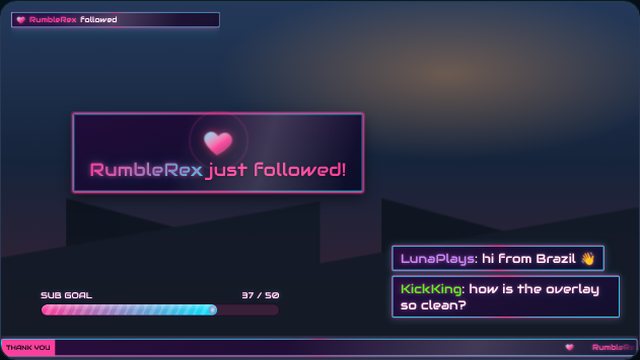
Overlays that work for RP
- A chat box on the side so viewers on mobile see the chat in VODs and clips.
- Stream labels with your character's name, and now playing only for copyright-safe music.
- Long sessions: bookmarks to mark scenes for highlights.
What roleplay viewers want
Roleplay streams are about character and story more than aiming. Viewers come for the personality, the relationships and the unfolding plot, and stay for hours. Stay in character where the server requires it, and plan how you handle out-of-character chat.
Read the server's streaming rules before you go live, since many have specific rules about stream delay and names.
Delay and server rules
Most roleplay servers require a stream delay to prevent viewers from interfering. Set it in OBS and tell chat so that they know to expect a gap. Do not reveal private information or let chat direct your actions in ways that break the server's rules.
Keep your moderators aware of the rules so that they can help.
Long sessions and clips
Roleplay sessions run long and produce memorable moments. Mark good scenes while you play and cut them afterwards. A clip with a few seconds of context works better than a bare punchline.
Take breaks, since long sessions are tiring for you and for viewers.
What your upload needs to be
Streaming only works if your upload can carry the bitrate with some room to spare. The table shows the upload speed needed for common settings, adding 30 percent as a safety margin, and the data a stream uses in an hour.
| Platform | Resolution | Bitrate | Upload needed | Data per hour |
|---|---|---|---|---|
| Twitch standard | 1080p60 | 6,000 kbps | 7.8 Mbps | 2.7 GB |
| Twitch fast game | 900p60 | 6,000 kbps | 7.8 Mbps | 2.7 GB |
| YouTube 1440p | 1440p60 | 12,000 kbps | 15.6 Mbps | 5.4 GB |
| Kick | 1080p60 | 7,000 kbps | 9.1 Mbps | 3.1 GB |
If your upload is lower than the figure in the table, choose a lower row. A steady 720p stream looks better to viewers than a 1080p stream that keeps dropping frames.
Other game guides
The guides for the other games cover where to stream each one from and how to lay out your overlay.
| Game | Platforms | Guide |
|---|---|---|
| GTA 6 | PS5, Xbox Series X|S (no PC version announced) | Guide |
| Minecraft | PC (Java and Bedrock), consoles, mobile | Guide |
| League of Legends | PC (Windows and Mac) | Guide |
| Counter-Strike 2 | PC | Guide |
| Valorant | PC, PS5, Xbox Series X|S | Guide |
| World of Warcraft | PC and Mac | Guide |
| Fortnite | PC, PS5, PS4, Xbox, Nintendo Switch and Switch 2, mobile | Guide |
| Call of Duty: Modern Warfare 4 | PC, PS5, Xbox Series X|S, Nintendo Switch 2 | Guide |
| Horror games | Every platform | Guide |
Titles, tags and thumbnails
A title should say what you are doing and why a viewer might care, in plain words. Include the game, the activity and any hook, such as a challenge or a goal. Tags help people find you, so add the ones that describe your language, your style and your content.
Keep the thumbnail simple if your platform uses one: a clear face, a short phrase and one bright color work better than a busy collage. Use the same style each time so that regular viewers recognize you in a list.
Balancing game sound, voice and music
Set the game quieter than your voice, so that viewers hear you clearly over gunfire or music. A common starting point is a voice that peaks in the upper green of the OBS meter and a game about ten decibels below that. Check the mix by listening to a recording with headphones, not only on the stream preview.
If you play music, use only music that you have the rights to, since copyrighted tracks can mute your replays or lead to strikes.
Before you go live
- Check the title and the game's category on your platform.
- Test your microphone and the game sound with a one-minute recording.
- Make sure your overlay does not cover the game's own interface.
- Set your stream delay if the game needs one.
- Close programs that use your upload or processor.
- Tell chat what you plan to play and for how long.
A routine like this takes five minutes and prevents the most common problems at the start of a stream.
Growing a channel around one game
Streaming one game gives you a clear identity, and viewers who search for that game can find you. The downside is that the game's popularity affects your audience. Keep a second game or a talk format in reserve for when interest in the first drops.
Track which titles, times and formats get the most viewers. Small changes, such as the first words of a title or the start time, can have a visible effect over a few weeks.
Gear
USB microphones, 1080p webcams, key lights, a Stream Deck. Amazon links are affiliate links (disclosure).
Grand Theft Auto V is a trademark of Rockstar Games and Take-Two Interactive. This guide is independent and isn't affiliated with or endorsed by Rockstar Games and Take-Two Interactive. The overlays and themes contain no game artwork.
Sources: Twitch State of Gaming 2026 (via tbreak); TwitchTracker: games by hours watched, October 2026 (via Resourcera). Checked November 13, 2026.