| Game | Platforms | Matching theme |
|---|---|---|
| 🌴 Grand Theft Auto VI | PS5, Xbox Series X|S (no PC version announced) | Neon Nights |
| 🧱 Minecraft | PC (Java and Bedrock), consoles, mobile | Voxel |
| ⚔️ League of Legends | PC (Windows and Mac) | Arena |
| 🚓 Grand Theft Auto V | PC, PS5, Xbox Series X|S (and last-gen consoles). RP servers are PC-only | Neon Nights |
| 💣 Counter-Strike 2 | PC | Arena |
| 🎯 Valorant | PC, PS5, Xbox Series X|S | Arena |
| 🐉 World of Warcraft | PC and Mac | Rune Forge |
| 🪂 Fortnite | PC, PS5, PS4, Xbox, Nintendo Switch and Switch 2, mobile | Arena |
| 🪖 Call of Duty: Modern Warfare 4 | PC, PS5, Xbox Series X|S, Nintendo Switch 2 | Arena |
| 🩸 Horror games | Every platform | Blood Moon |
Game-genre themes
Five original looks for the Overlay Suite and the starting-soon screens: Neon Nights (open-world city), Blood Moon (horror), Rune Forge (fantasy and MMOs), Voxel (sandbox) and Arena (esports and shooters). They use no game artwork, so you can use them on any stream.
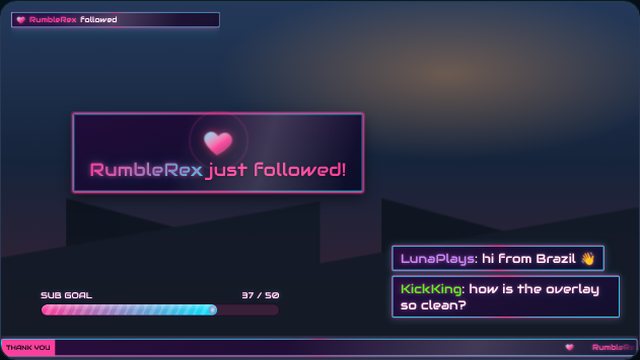 Neon Nights
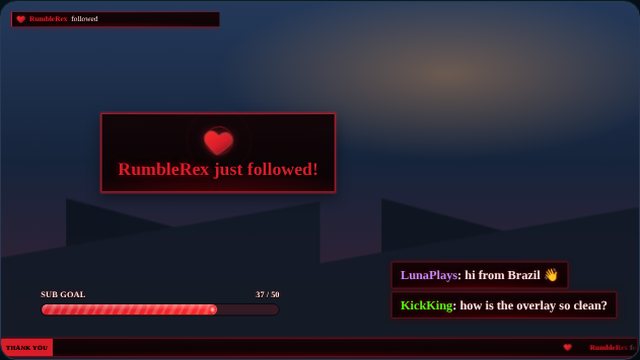 Blood Moon
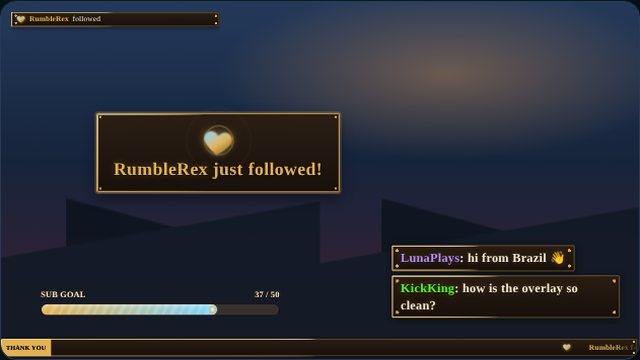 Rune Forge
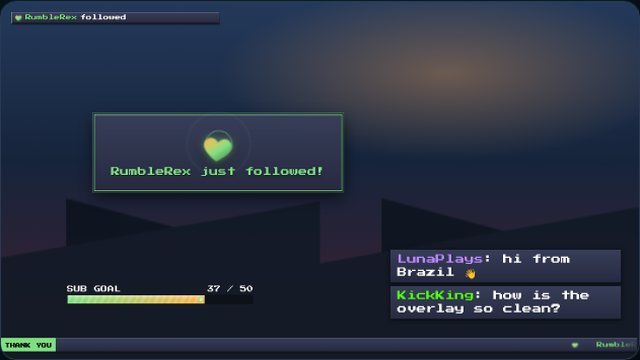 Voxel
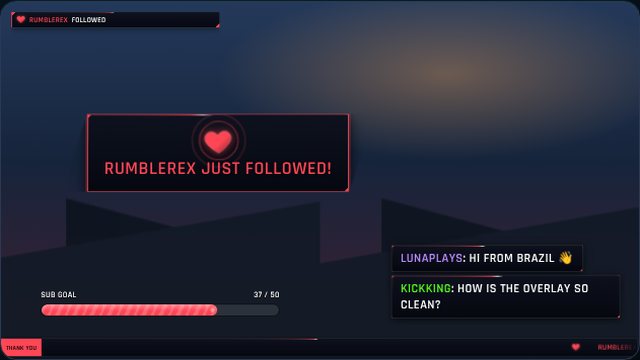 Arena
Every game guide at a glance
Each game has a guide with platform routes, OBS settings, overlay placement and gear. The table shows where each game can be streamed from.
| Game | Platforms | Key fact |
|---|---|---|
| GTA 6 | PS5, Xbox Series X|S (no PC version announced) | November 19, 2026 |
| Minecraft | PC (Java and Bedrock), consoles, mobile | Most-watched game |
| League of Legends | PC (Windows and Mac) | Most-watched game, Jan to Sep 2026 |
| GTA V and GTA RP | PC, PS5, Xbox Series X|S (and last-gen consoles). RP servers are PC-only | A top-5 most-watched game |
| Counter-Strike 2 | PC | Second most-watched game, 2026 |
| Valorant | PC, PS5, Xbox Series X|S | A top-5 most-watched game |
| World of Warcraft | PC and Mac | A top-5 most-watched game |
| Fortnite | PC, PS5, PS4, Xbox, Nintendo Switch and Switch 2, mobile | PC, consoles and mobile |
| Call of Duty: Modern Warfare 4 | PC, PS5, Xbox Series X|S, Nintendo Switch 2 | Out October 23, 2026 |
| Horror games | Every platform | One of 2026's fastest-growing genres |
What your upload needs to be
Streaming only works if your upload can carry the bitrate with some room to spare. The table shows the upload speed needed for common settings, adding 30 percent as a safety margin, and the data a stream uses in an hour.
| Platform | Resolution | Bitrate | Upload needed | Data per hour |
|---|---|---|---|---|
| Twitch standard | 1080p60 | 6,000 kbps | 7.8 Mbps | 2.7 GB |
| Twitch fast game | 900p60 | 6,000 kbps | 7.8 Mbps | 2.7 GB |
| YouTube 1440p | 1440p60 | 12,000 kbps | 15.6 Mbps | 5.4 GB |
| Kick | 1080p60 | 7,000 kbps | 9.1 Mbps | 3.1 GB |
If your upload is lower than the figure in the table, choose a lower row. A steady 720p stream looks better to viewers than a 1080p stream that keeps dropping frames.
Other game guides
The guides for the other games cover where to stream each one from and how to lay out your overlay.
| Game | Platforms | Guide |
|---|---|---|
| GTA 6 | PS5, Xbox Series X|S (no PC version announced) | Guide |
| Minecraft | PC (Java and Bedrock), consoles, mobile | Guide |
| League of Legends | PC (Windows and Mac) | Guide |
| GTA V and GTA RP | PC, PS5, Xbox Series X|S (and last-gen consoles). RP servers are PC-only | Guide |
| Counter-Strike 2 | PC | Guide |
| Valorant | PC, PS5, Xbox Series X|S | Guide |
| World of Warcraft | PC and Mac | Guide |
| Fortnite | PC, PS5, PS4, Xbox, Nintendo Switch and Switch 2, mobile | Guide |
| Call of Duty: Modern Warfare 4 | PC, PS5, Xbox Series X|S, Nintendo Switch 2 | Guide |
| Horror games | Every platform | Guide |
Titles, tags and thumbnails
A title should say what you are doing and why a viewer might care, in plain words. Include the game, the activity and any hook, such as a challenge or a goal. Tags help people find you, so add the ones that describe your language, your style and your content.
Keep the thumbnail simple if your platform uses one: a clear face, a short phrase and one bright color work better than a busy collage. Use the same style each time so that regular viewers recognize you in a list.
Balancing game sound, voice and music
Set the game quieter than your voice, so that viewers hear you clearly over gunfire or music. A common starting point is a voice that peaks in the upper green of the OBS meter and a game about ten decibels below that. Check the mix by listening to a recording with headphones, not only on the stream preview.
If you play music, use only music that you have the rights to, since copyrighted tracks can mute your replays or lead to strikes.
Before you go live
- Check the title and the game's category on your platform.
- Test your microphone and the game sound with a one-minute recording.
- Make sure your overlay does not cover the game's own interface.
- Set your stream delay if the game needs one.
- Close programs that use your upload or processor.
- Tell chat what you plan to play and for how long.
A routine like this takes five minutes and prevents the most common problems at the start of a stream.
Growing a channel around one game
Streaming one game gives you a clear identity, and viewers who search for that game can find you. The downside is that the game's popularity affects your audience. Keep a second game or a talk format in reserve for when interest in the first drops.
Track which titles, times and formats get the most viewers. Small changes, such as the first words of a title or the start time, can have a visible effect over a few weeks.
Streaming more than one game
Many streamers play several games, and variety keeps a channel fresh. The risk is that viewers who came for one game may not stay for another. Announce changes in advance, keep your style and tone the same and give regulars a reason to stay, such as a recurring segment or community game night.
Use the guides above for each game's settings, since the layout and delay needs differ.
Using the overlay themes
Each game guide names a matching theme in the overlay suite. The themes are original designs, so they carry no game art, and they change alerts, chat, goals and labels together so the stream looks consistent. Try the theme in a test recording and check that nothing covers the game's interface.
If you stream several games, pick one theme for your channel and keep it, so that viewers recognize you whatever you play.
How to choose a game to stream
Pick a game you enjoy enough to play for hours, that has an audience, and where you can offer something particular. A very popular game has many viewers but also many streamers, while a smaller game has fewer viewers and less competition. Many small streamers do best in the middle.
Check how many streamers and viewers a game has before you commit, and see what the smallest successful streamers do differently.
Game names are trademarks of their owners. These guides are independent and not affiliated with any publisher.